Download Subtitles for How to Setup an SSH Server on Windows
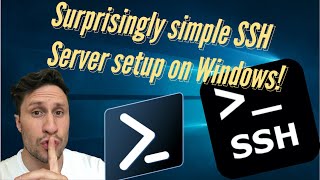
How to setup an SSH Server on Windows in 3 easy steps
Demetri de Skepsi
SRT - Most compatible format for video players (VLC, media players, video editors)
VTT - Web Video Text Tracks for HTML5 video and browsers
TXT - Plain text with timestamps for easy reading and editing
Scroll to view all subtitles
hey what's up you beautiful people today
we'll be setting up an SSH server on a
Windows device I'll be walking through
both the UI and Powershell scripting
methods for this on your server which
doesn't have to be Windows Server OS as
openssh can run on a regular version of
Windows like home Pro or Enterprise go
to the apps and features
click optional features add feature
search for openssh server and install it
[Music]
then you'll need to start the SSH server
and you should set the service to
automatic so what runs when the PC boots
or there is a power outage and you've
thought far enough ahead to set the bios
of the server to boot on power open up
the services app
search for openssh server
[Music]
right click Start
right-click properties set to automatic
the firewall rule to allow connections
to the SSH server via Port 22 should be
assigned just by installing the open SSH
server but it's good to check here's
where Windows Defender Firewall
advanced settings
or just go straight to the Windows
Defender Firewall with Advanced security
by searching for WF dot MSC much easier
that way I didn't even know the
shorthand for that app until making this
video
[Music]
now let's check that we can actually get
in Via SSH open command prompt on a
different computer on the same network
and type SSH
your username at the computer name and
hit enter you'll be greeted by this
message type yes and hit enter Then type
your password
dope you're in you did it good job just
to drive the point home that we're
actually on the remote computer via SSH
let's create a folder on the desktop
change directory to the desktop
[Music]
make a directory
[Music]
there you go you made a folder on your
desktop
from a different computer remotely with
SSH
and just so you're convinced that this
is on another computer I'm going to
change the view see my VM here and my
terminal here
and that's it you're done now let's go
through the same steps using Powershell
[Music]
run this command which puts the name of
the openssh server application into the
variable openssh then run this command
which installs the openssh server
followed by this command to start the
SSH service
then this command to set that service to
run automatically and finally this
command to verify that the firewall rule
is present and if not it will create
that rule for you you can also do this
if there's an issue with the firewall
rule when you set it up with the
graphical user interface and that's it
now you have remote access via SSH to
This Server if you like it like it
comment with questions and concerns
subscribe and share you can listen to
the background music at the Civil devil
Productions Channel links below and if
you're a Creator and want it in your
content you can buy it at the beatstars
page also linked below
Full transcript without timestamps
hey what's up you beautiful people today we'll be setting up an SSH server on a Windows device I'll be walking through both the UI and Powershell scripting methods for this on your server which doesn't have to be Windows Server OS as openssh can run on a regular version of Windows like home Pro or Enterprise go to the apps and features click optional features add feature search for openssh server and install it [Music] then you'll need to start the SSH server and you should set the service to automatic so what runs when the PC boots or there is a power outage and you've thought far enough ahead to set the bios of the server to boot on power open up the services app search for openssh server [Music] right click Start right-click properties set to automatic the firewall rule to allow connections to the SSH server via Port 22 should be assigned just by installing the open SSH server but it's good to check here's where Windows Defender Firewall advanced settings or just go straight to the Windows Defender Firewall with Advanced security by searching for WF dot MSC much easier that way I didn't even know the shorthand for that app until making this video [Music] now let's check that we can actually get in Via SSH open command prompt on a different computer on the same network and type SSH your username at the computer name and hit enter you'll be greeted by this message type yes and hit enter Then type your password dope you're in you did it good job just to drive the point home that we're actually on the remote computer via SSH let's create a folder on the desktop change directory to the desktop [Music] make a directory [Music] there you go you made a folder on your desktop from a different computer remotely with SSH and just so you're convinced that this is on another computer I'm going to change the view see my VM here and my terminal here and that's it you're done now let's go through the same steps using Powershell [Music] run this command which puts the name of the openssh server application into the variable openssh then run this command which installs the openssh server followed by this command to start the SSH service then this command to set that service to run automatically and finally this command to verify that the firewall rule is present and if not it will create that rule for you you can also do this if there's an issue with the firewall rule when you set it up with the graphical user interface and that's it now you have remote access via SSH to This Server if you like it like it comment with questions and concerns subscribe and share you can listen to the background music at the Civil devil Productions Channel links below and if you're a Creator and want it in your content you can buy it at the beatstars page also linked below
Keep this transcript
Save it to LunaNotes and it becomes a real note in your library — editable, searchable, and ready to turn into flashcards or a diagram. Free to start.
Save to LunaNotesOr download subtitles for another video.
These subtitles were extracted using the Free YouTube subtitle downloader by LunaNotes.
Related videos
Download Subtitles: How To Learn Hacking – A Practical Demo
Get the complete subtitles for the 'How To Learn Hacking' practical demo. Enhance your learning by reading along with key steps and commands, perfect for following complex demonstrations.
Download Subtitles for Azure AI Foundry Basic Agent Setup
Enhance your learning experience by downloading accurate subtitles for the Azure AI Foundry Basic Agent Setup video. Follow step-by-step instructions easily with clear captions, ensuring you don't miss any crucial details. Perfect for accessibility and improved comprehension.

Download Subtitles for Lunar Client Settings Tutorial
Enhance your understanding of Lunar Client configurations with our easy-to-follow subtitles. Download subtitles to follow along clearly and customize your gaming experience effortlessly.
Download Subtitles for How to Boot Surface from USB
Easily download subtitles for the video 'How to Boot a Surface from a USB Device' to follow along step-by-step. Subtitles enhance understanding and accessibility, making it simpler to grasp the boot process on Microsoft Surface devices.

Download Subtitles for How to Create a FREE eCommerce Website
Easily download accurate subtitles for this detailed tutorial on creating a free eCommerce website using WordPress and WooCommerce. Enhance your learning experience and follow along step-by-step with clear captions in 2026's latest online store setup guide.
Most viewed

Untertitel für 'Nicos Weg' Deutsch lernen A1 Film herunterladen
Laden Sie die Untertitel für den gesamten Film 'Nicos Weg' herunter, um Ihr Deutschlernen auf A1 Niveau zu unterstützen. Untertitel helfen Ihnen, Wortschatz und Aussprache besser zu verstehen und verbessern das Hörverständnis effektiv.

ดาวน์โหลดซับไตเติ้ล DMD LAND 3 The Final Land Day 1
ดาวน์โหลดซับไตเติ้ลสำหรับวิดีโอ DMD LAND 3 The Final Land Day 1 เพื่อช่วยให้เข้าใจเนื้อหาได้ง่ายขึ้น และเพิ่มความสะดวกในการติดตามทุกช่วงเวลา เหมาะสำหรับผู้ชมที่ต้องการความชัดเจนและเข้าถึงข้อมูลอย่างครบถ้วน

Subtítulos para TIPOS DE APEGO | 6 DE COPAS Episodio 56
Descarga los subtítulos para el episodio 56 de la tercera temporada de 6 DE COPAS, centrado en los tipos de apego. Mejora tu comprensión y disfruta del contenido en detalle con nuestros subtítulos precisos y accesibles.

Download Subtitles for Harvard CS50 2026 Computer Science Course
Enhance your learning experience with downloadable subtitles for the Harvard CS50 2026 full computer science course. Easily follow along with lectures, improve comprehension, and access the content offline anytime. Perfect for students and enthusiasts aiming to master computer science concepts.

Descarga Subtítulos para NARCISISMO | 6 DE COPAS - Episodio 63
Accede fácilmente a los subtítulos del episodio 63 de '6 DE COPAS', centrado en el narcisismo. Descargar estos subtítulos te ayudará a entender mejor el contenido y mejorar la experiencia de visualización.
Found this transcript useful?
Take it with you. One click puts it in your own LunaNotes library.
Save to LunaNotes