Download Captions for FREE CCNA Lab 052 InterVLAN Routing
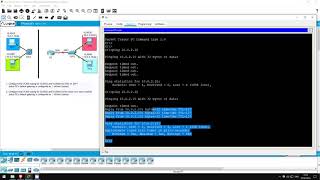
FREE CCNA Lab 052: InterVLAN Routing (SVI, Router on a Stick)
Jeremy's IT Lab
SRT - Most compatible format for video players (VLC, media players, video editors)
VTT - Web Video Text Tracks for HTML5 video and browsers
TXT - Plain text with timestamps for easy reading and editing
Scroll to view all subtitles
welcome to this free CCNA packet tracer
practice lab you can download the lab
file from the link in the description if
you like these labs please consider
supporting me via my patreon or the
cryptocurrency options in the
description also please subscribe to the
channel for more labs like this in this
lab we will take a look at two methods
of inter VLAN routing using two small
networks one is known as router on a
stick which we already covered in the
icnd1 labs but we will do a little
review here the other method is using
SBI's on a multi-layer switch which is a
switch with routing capabilities let's
get started first let's configure switch
1 for inter VLAN routing using s vis
switch 1 isn't connected to a router in
this small network and even if it were
it might be preferable for a switch 1 to
rub between VLANs itself without having
to send the traffic to a router now pc1
& pc2 shouldn't be able to ping each
other at the moment let's try from PC 1
ping 1002 10
doesn't work let's go on switch one and
make it work an able coffee tea ok the
first step is to enable IP routing on
the switch which is done with the
command IP routing this enables the
layer 3 capabilities of this multi-layer
switch next we just have to configure
the VLANs with IP addresses interface
VLAN 10 I configured each PC to use the
dot 1 address of their subnet as a
default gateway
so for VLAN 10 IP address 1001 one
255.255.255.0 also SV eyes are shut down
by default so remember no shutdown now
let's configure VLAN 20 interface VLAN
20 IP address 1002 one 255.255.255.0 no
shutdown that's all there is to it
keep in mind I already configured switch
ones interfaces connected to a PC one
and PC two to be in VLAN 10 and VLAN 20
do show VLAN brief there you go
now let's try our ping once more from PC
one ping 1000 two 1000 all there is to
inter VLAN routing using SBI's for a
quick review enable IP routing on the
multi-layer switch create the
appropriate SV eyes with the interface
VLAN command configure IP addresses on
the SV eyes and enable them with no
shutdown next let's configure inter VLAN
routing in our other small network using
the router on a stick method by using
sub interfaces r2 can act as a default
gateway for multiple subnets using a
single physical interface again I
already configured the switch to
interface
is connected to a PC 3 and PC for to be
in VLAN 30 and VLAN 40 so we just have
to configure the connection between
switch 2 and R 2 let's just show that PC
3 and PC for can't pin each other at the
moment
upping from PC 3 to PC for ping 1004 10
doesn't work
first let's go on switch to enable golf
tee all we have to do here is configure
g0 one as a trunk interface g0 1 switch
port mode trunk
that's all now let's go to our to enable
golf tee let's enable the g00 interface
interface G 0 0 no shutdown now let's
create a sub interface for VLAN 30
interface G 0 0 30 next specify this sub
interface as being before VLAN 30
encapsulation dot1q 30 next we just add
the IP address IP address 1003 1 255 255
255 0 that's all now let's make another
sub interface for VLAN 40 and do the
same interface G 0 0.40 encapsulation
dot1q 40 IP address 1004 1 255.255.255.0
that's all there is to router on a stick
let's try that ping again from pc 3 ping
1004 1
okay there we go
in this slob we looked at two methods of
inter VLAN routing SV eyes and router on
a stick that's all for this lab thank
you for watching I hope this lab and
video have been helpful for you please
subscribe for future labs like this
which will be released weekly if you
have requests for any specific labs let
me know in the comment section if you
want to support my channel I accept
Bitcoin and aetherium donations via the
addresses in the description I am also a
brave verified publisher and accept bat
or basic attention token donations in
the brave browser
Full transcript without timestamps
welcome to this free CCNA packet tracer practice lab you can download the lab file from the link in the description if you like these labs please consider supporting me via my patreon or the cryptocurrency options in the description also please subscribe to the channel for more labs like this in this lab we will take a look at two methods of inter VLAN routing using two small networks one is known as router on a stick which we already covered in the icnd1 labs but we will do a little review here the other method is using SBI's on a multi-layer switch which is a switch with routing capabilities let's get started first let's configure switch 1 for inter VLAN routing using s vis switch 1 isn't connected to a router in this small network and even if it were it might be preferable for a switch 1 to rub between VLANs itself without having to send the traffic to a router now pc1 & pc2 shouldn't be able to ping each other at the moment let's try from PC 1 ping 1002 10 doesn't work let's go on switch one and make it work an able coffee tea ok the first step is to enable IP routing on the switch which is done with the command IP routing this enables the layer 3 capabilities of this multi-layer switch next we just have to configure the VLANs with IP addresses interface VLAN 10 I configured each PC to use the dot 1 address of their subnet as a default gateway so for VLAN 10 IP address 1001 one 255.255.255.0 also SV eyes are shut down by default so remember no shutdown now let's configure VLAN 20 interface VLAN 20 IP address 1002 one 255.255.255.0 no shutdown that's all there is to it keep in mind I already configured switch ones interfaces connected to a PC one and PC two to be in VLAN 10 and VLAN 20 do show VLAN brief there you go now let's try our ping once more from PC one ping 1000 two 1000 all there is to inter VLAN routing using SBI's for a quick review enable IP routing on the multi-layer switch create the appropriate SV eyes with the interface VLAN command configure IP addresses on the SV eyes and enable them with no shutdown next let's configure inter VLAN routing in our other small network using the router on a stick method by using sub interfaces r2 can act as a default gateway for multiple subnets using a single physical interface again I already configured the switch to interface is connected to a PC 3 and PC for to be in VLAN 30 and VLAN 40 so we just have to configure the connection between switch 2 and R 2 let's just show that PC 3 and PC for can't pin each other at the moment upping from PC 3 to PC for ping 1004 10 doesn't work first let's go on switch to enable golf tee all we have to do here is configure g0 one as a trunk interface g0 1 switch port mode trunk that's all now let's go to our to enable golf tee let's enable the g00 interface interface G 0 0 no shutdown now let's create a sub interface for VLAN 30 interface G 0 0 30 next specify this sub interface as being before VLAN 30 encapsulation dot1q 30 next we just add the IP address IP address 1003 1 255 255 255 0 that's all now let's make another sub interface for VLAN 40 and do the same interface G 0 0.40 encapsulation dot1q 40 IP address 1004 1 255.255.255.0 that's all there is to router on a stick let's try that ping again from pc 3 ping 1004 1 okay there we go in this slob we looked at two methods of inter VLAN routing SV eyes and router on a stick that's all for this lab thank you for watching I hope this lab and video have been helpful for you please subscribe for future labs like this which will be released weekly if you have requests for any specific labs let me know in the comment section if you want to support my channel I accept Bitcoin and aetherium donations via the addresses in the description I am also a brave verified publisher and accept bat or basic attention token donations in the brave browser
Keep this transcript
Save it to LunaNotes and it becomes a real note in your library — editable, searchable, and ready to turn into flashcards or a diagram. Free to start.
Save to LunaNotesOr download subtitles for another video.
These subtitles were extracted using the Free YouTube subtitle downloader by LunaNotes.
Related videos

Subtitles for CompTIA A+ 1201 Network Hardware Secrets (Obj. 2.5)
Enhance your CompTIA A+ exam preparation with downloadable subtitles for this Network Hardware Secrets review. Perfect for mastering Obj. 2.5, these captions help you capture key details about network hardware components and troubleshooting. Improve retention and accessibility while following the video lesson.
Download Wi-Fi 4-Way Handshake Subtitles for Better Understanding
Download accurate subtitles for the Wi-Fi 4-Way Handshake video to enhance your learning experience. Captions help clarify complex concepts and improve comprehension for all viewers. Access downloadable subtitles now to study networking protocols effectively.
Download Subtitles for XLMRat Lab - Cyberdefenders Video
Enhance your understanding of cybersecurity with downloadable subtitles for the XLMRat Lab - Cyberdefenders video. Access accurate captions to follow complex concepts easily and improve learning efficiency.
Download Subtitles for Adobe Illustrator Beginners FREE Course
Enhance your learning experience with accessible subtitles for the Adobe Illustrator for Beginners FREE Course. Download captions to follow along easily, improve comprehension, and master the software at your own pace.
Download Subtitles for Introduction to DaVinci Resolve Full Course
Enhance your learning experience by downloading accurate subtitles for the Introduction to DaVinci Resolve full course. Captions help you follow along effortlessly, improve comprehension, and make the tutorial accessible anytime, anywhere.
Most viewed

Untertitel für 'Nicos Weg' Deutsch lernen A1 Film herunterladen
Laden Sie die Untertitel für den gesamten Film 'Nicos Weg' herunter, um Ihr Deutschlernen auf A1 Niveau zu unterstützen. Untertitel helfen Ihnen, Wortschatz und Aussprache besser zu verstehen und verbessern das Hörverständnis effektiv.

ดาวน์โหลดซับไตเติ้ล DMD LAND 3 The Final Land Day 1
ดาวน์โหลดซับไตเติ้ลสำหรับวิดีโอ DMD LAND 3 The Final Land Day 1 เพื่อช่วยให้เข้าใจเนื้อหาได้ง่ายขึ้น และเพิ่มความสะดวกในการติดตามทุกช่วงเวลา เหมาะสำหรับผู้ชมที่ต้องการความชัดเจนและเข้าถึงข้อมูลอย่างครบถ้วน

Subtítulos para TIPOS DE APEGO | 6 DE COPAS Episodio 56
Descarga los subtítulos para el episodio 56 de la tercera temporada de 6 DE COPAS, centrado en los tipos de apego. Mejora tu comprensión y disfruta del contenido en detalle con nuestros subtítulos precisos y accesibles.

Download Subtitles for Harvard CS50 2026 Computer Science Course
Enhance your learning experience with downloadable subtitles for the Harvard CS50 2026 full computer science course. Easily follow along with lectures, improve comprehension, and access the content offline anytime. Perfect for students and enthusiasts aiming to master computer science concepts.

Descarga Subtítulos para NARCISISMO | 6 DE COPAS - Episodio 63
Accede fácilmente a los subtítulos del episodio 63 de '6 DE COPAS', centrado en el narcisismo. Descargar estos subtítulos te ayudará a entender mejor el contenido y mejorar la experiencia de visualización.
Found this transcript useful?
Take it with you. One click puts it in your own LunaNotes library.
Save to LunaNotes